Stockity Registration Guide 2026: How to Create an Account Step by Step

In this step-by-step guide, you’ll learn how to create a Stockity account, what information is required during registration, and how to access the demo platform before deciding whether to use real funds.

How to Create a Stockity Account — Complete Registration Guide for Beginners
New to Stockity and not sure where to start? This guide walks you through everything you need to know about creating your Stockity account, from the registration process to accessing the platform and placing your very first trade — step by step and in plain language.
What Is Stockity?
Stockity is a modern and beginner-friendly online trading platform. Stockity states that it has more than 3.5 million users across over 130 countries. Designed with simplicity and accessibility at its core, the platform gives traders of all experience levels the tools they need to participate in financial markets.
Whether you are a complete newcomer exploring trading for the very first time or an experienced trader looking for a reliable and fast platform, Stockity offers a clean interface, analytical tools, and flexible trading conditions.
Why Choose Stockity?
Before diving into the registration process, here is a quick look at what the platform offers:
- $10,000 demo account — practice trading with virtual funds before risking real money.
- Low minimum deposit — Stockity commonly lists a starting deposit around $10, though the exact amount shown in the cashier can vary by payment method and region.
- Low minimum trade amount — Stockity states a minimum trade amount of around $1.
- Analytical tools — indicators and drawing tools for chart analysis.
- Customer support — available via email and live chat.
- Education section — trading strategies and resources within the platform.
- Multiple payment methods — options such as Visa, Mastercard, cryptocurrency, Perfect Money, FasaPay, and internet banking may be available depending on your location and are displayed in the account’s deposit section.
Referral rewards, account tiers, and available payment methods may differ by region and may change over time. Users should review the current terms displayed in their own account rather than relying solely on this guide.
What You Need Before Registering
Getting started on Stockity is quick and straightforward. Before beginning the registration process, make sure you have the following ready:
- A valid email address you actively use
- A secure password (8 to 64 characters, using letters, numbers, and special symbols)
- Your phone number (optional but recommended for added account security)
- A device with a stable internet connection — desktop, tablet, or smartphone
- Your preferred account currency selected in advance
No documents are required at the registration stage. Stockity may request identity or payment verification before a withdrawal or whenever additional account checks are required.
Ready to get started? Create Your Free Stockity Account Here
Stockity Registration — Key Facts at a Glance
| Detail | Information |
|---|---|
| Common Starting Deposit | Around $10, subject to the amount shown in the cashier |
| Demo Account Balance | $10,000 virtual funds |
| Common Minimum Trade Amount | Around $1 |
| Registration Fee | Free |
| Documents Required at Sign Up | None |
| Supported Currencies | USD, EUR, IDR and more |
| Mobile App Available | Yes — iOS and Android |
| Referral Bonus | Up to $100 |
The figures above are as stated by Stockity and may change. Always confirm current terms in your account before depositing.
How to Sign Up on Stockity — A Complete Step-by-Step Registration Guide for Beginners
Step 1: Visit the Official Stockity Website
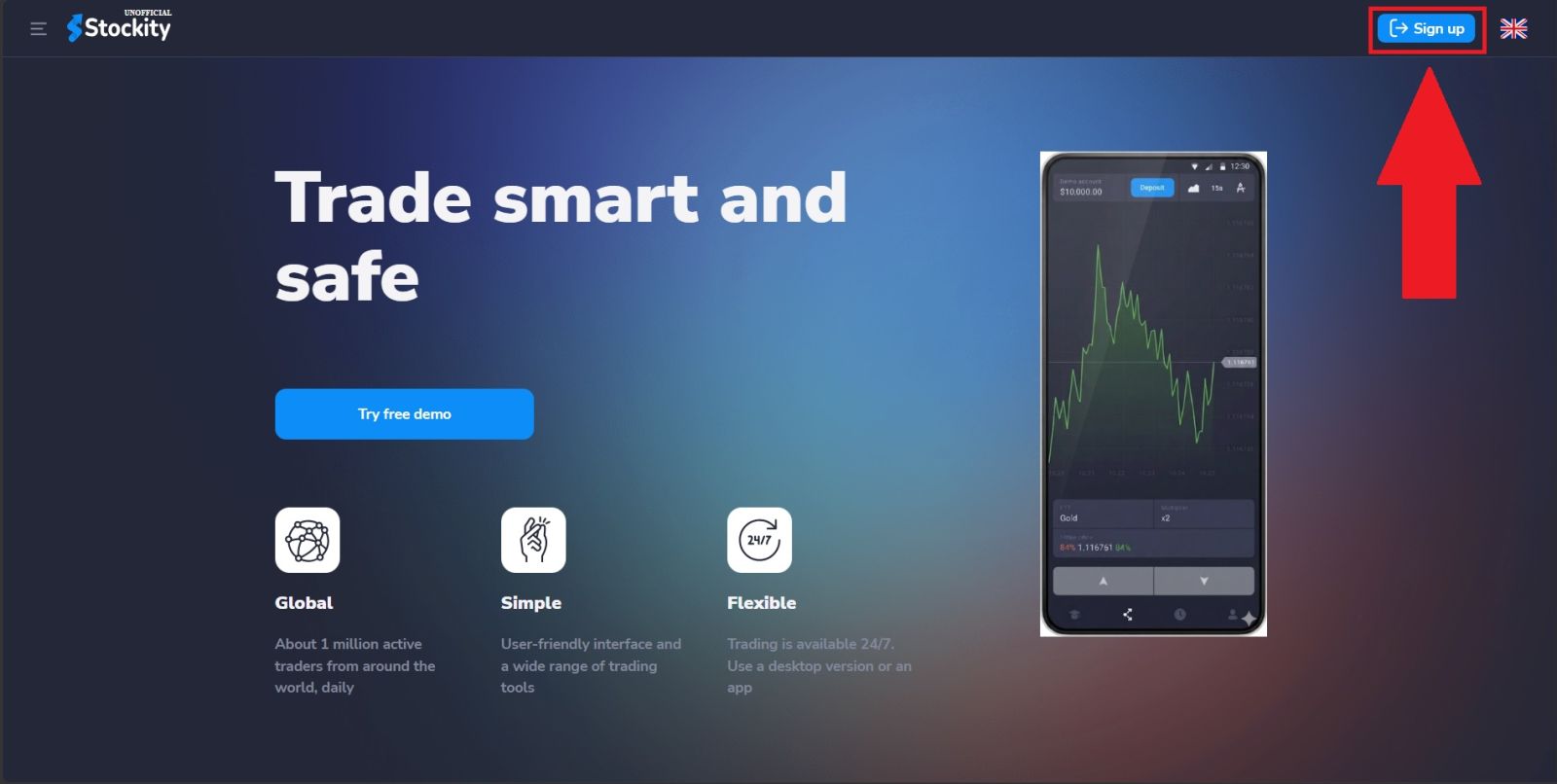
Open your preferred web browser and navigate to the official Stockity website. Before entering any personal information, always take a moment to verify that you are on the correct and legitimate domain.
Once you are on the homepage, click the "Sign up" button to begin the registration process.
Step 2: Fill In Your Registration Details
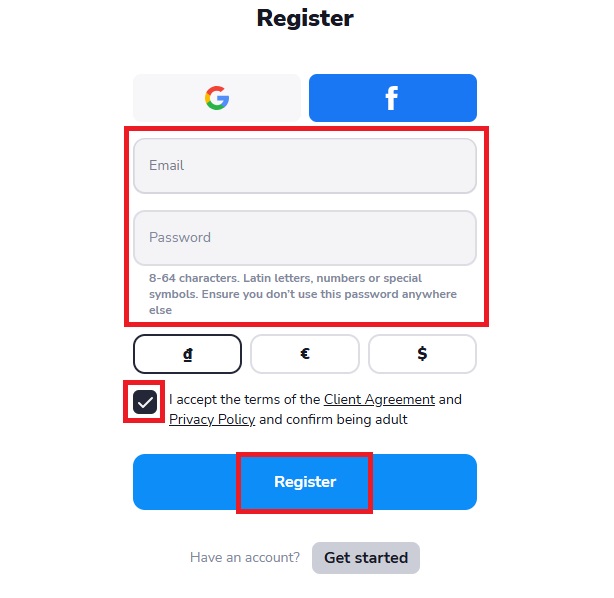
You will be taken to the registration form where you need to provide a few basic details to set up your account.
- Enter Your Email Address
Type in a valid and active email address in the email field. This will serve as your primary login credential and will be used for all account communications including password recovery, transaction notifications, and platform updates.
- Create a Secure Password
Choose a strong and unique password for your Stockity account. The platform requires passwords to be between 8 and 64 characters and recommends using a combination of Latin letters, numbers, and special symbols. Importantly, Stockity advises that you do not reuse a password from another platform — keeping your trading account password unique adds an important layer of security.
Once all fields are completed, tick the box and click the "Register" button to submit your registration.
Step 3: Access Your Dashboard
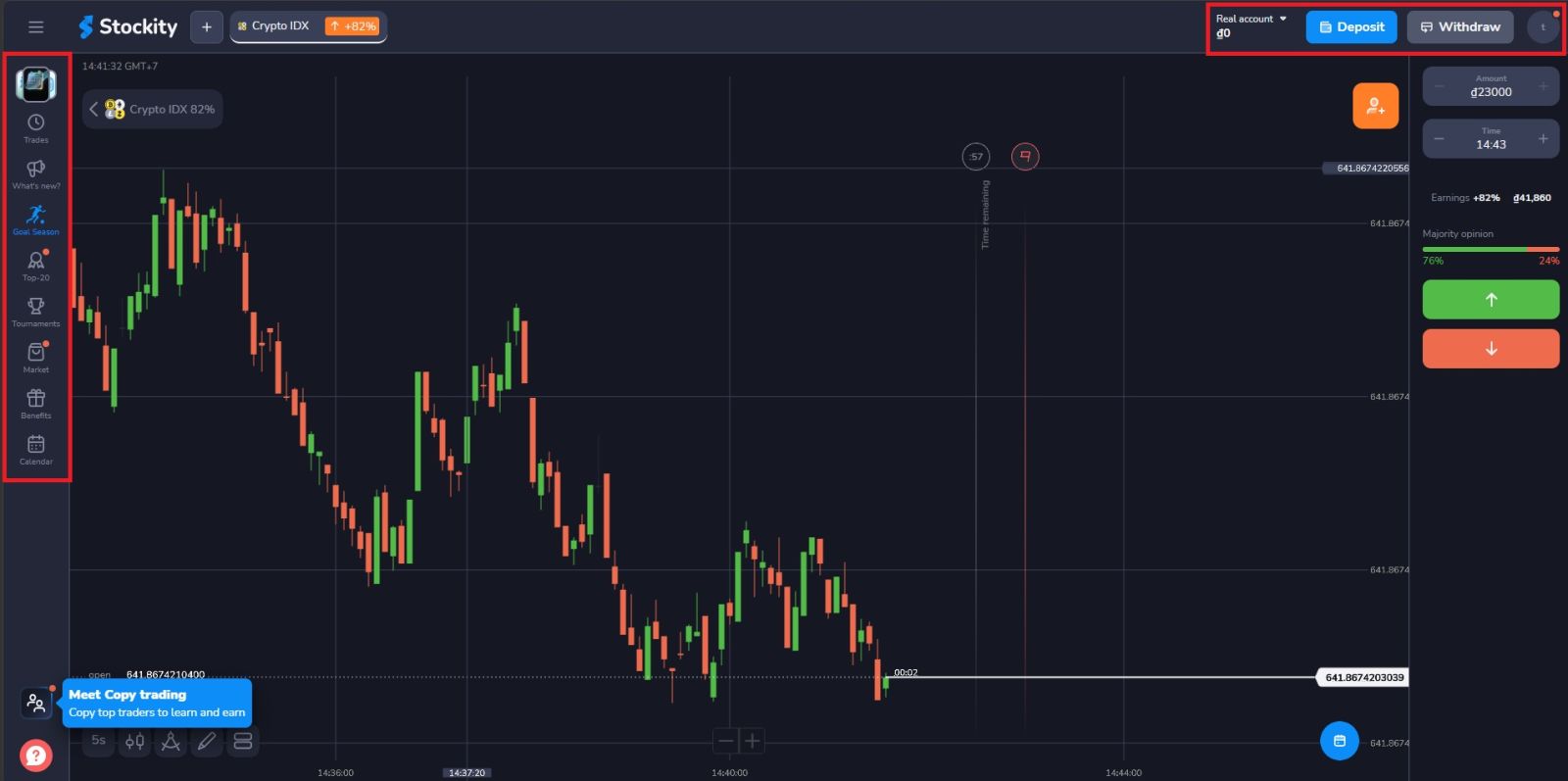
You will be directed to your personal trading dashboard — the central hub for all your activity on the platform. From here you can:
- Switch between your demo account and real trading account
- Browse and select from a wide range of tradeable assets
- Access the platform’s analytical tools and chart indicators
- Manage deposits and withdrawal requests
- Monitor your open and closed trades
- Update your profile and security settings
- Contact customer support
- Access the education section for trading strategies and guides
Take some time to explore the dashboard layout before jumping into trading. Familiarity with the interface makes your trading experience significantly smoother.
How to Make Your First Deposit on Stockity
After registration, you can remain in demo mode for as long as you like or open the cashier to view the deposit methods and minimum amount currently available for your account and region. For a full walkthrough of payment options and processing times, see our dedicated Stockity Deposit Guide.
- 💳 Visa and Mastercard — instant processing for most transactions
- 📱 FasaPay — popular in Southeast Asian markets
- 🌐 Internet Banking — local bank transfers depending on your region
- 💰 Perfect Money — fast e-wallet transfers
- ₿ Cryptocurrency — borderless deposits available 24/7
Stockity Referral Program
Stockity offers a partner/referral program that rewards users for inviting others to the platform. Reward amounts, tiers, and eligibility rules are set by Stockity and can change, so check the current terms displayed in your account rather than a fixed figure.
This makes Stockity not just a trading platform but also an opportunity to earn additional income simply by sharing it with people in your network.
Tips for Getting the Most Out of Your Stockity Account
Once your account is set up and active, here are some practical tips to help you get the best possible start:
- Practice extensively on the demo account
Do not rush to deposit real money. The demo account exists for a reason — use it until you are genuinely confident in your approach before making the switch to live trading.
- Start with the minimum deposit
Do not increase your deposit simply because of a short period of positive demo or real-account results — past or short-term performance does not predict future outcomes, and fixed-time and other trading products carry real risk of loss.
- Use the analytical tools
- Take advantage of the free education
The platform offers free educational resources and trading strategies. Investing time in learning before investing real money is always the smartest move.
- Keep your account secure
Use a unique password, enable any available two-factor authentication, and never share your login credentials with anyone.
Your trading journey starts with a single click.
👉 Create your free account: Register on Stockity Today
👉 Start practicing: Open a Demo Account on Stockity
👉 Fund your account: How to Deposit on Stockity
Conclusion: Start Your Trading Journey on Stockity Today
Creating a Stockity account requires only an email address and a password, and takes just a few minutes. No documents are needed to register, though Stockity may request identity or payment verification later, particularly before a withdrawal.
New users are not required to deposit immediately — the platform provides a $10,000 demo account that can be used to explore the interface and tools before any real money is involved. If and when you choose to trade with real funds, keep in mind that trading carries a genuine risk of loss, and you should only deposit amounts you are prepared to lose.