Stockity Deposit Methods: Complete Guide to Funding Your Account in 2026

In this complete guide will explains how to view the methods available in your account, enter a deposit amount, review possible charges, and troubleshoot common payment delays.

How to Deposit Money on Stockity — Complete Funding Guide for Traders
Ready to fund your Stockity account and start trading with real money? This guide covers common payment categories and explains how to check the methods available in your account, the full step-by-step deposit process, fees, processing times, and everything else you need to know to get your funds in safely and quickly.
Getting Your Account Ready to Trade
Creating a Stockity account gives you immediate access to a $10,000 demo account — but to participate in live trading and unlock the platform’s full potential, you need to fund your real account first. Stockity has a low $10 minimum entry point and support for a wide range of payment methods from bank cards to cryptocurrency.
Any fees are shown before you confirm a deposit, though your provider or a currency conversion may still add its own charge — see the Fees section below.
This guide walks you through everything from choosing the right payment method to confirming your balance is updated and ready to trade.
Why Fund Your Stockity Account?
Depositing activates real-money trading, which also introduces the risk of losing the amount used in each trade. Practicing in demo mode does not guarantee similar results with real funds.
While the demo account is a powerful practice tool, real trading opens up a completely different set of opportunities:
- Access to live trading across all available financial assets
- Eligibility for deposit bonuses and platform promotions
- Participation in trading tournaments with real prize pools
- The ability to request withdrawals from an eligible real-account balance, subject to verification and payment rules
- Access to higher account tiers with increased perks and benefits
- Eligibility for the referral program earning up to $100 per friend invited
Stockity Deposit — Key Facts at a Glance
| Detail | Information |
|---|---|
| Minimum Deposit | $10 (The minimum amount is displayed in the cashier and may vary by payment method, currency and account location.) |
| Platform Deposit Fee | Review the amount shown before confirmation; provider or currency conversion charges may still apply. |
| Fastest Method | Bank Card / E-Wallet (typically credited within minutes) |
| Crypto Processing Time | 10 – 60 minutes (Estimated times vary by provider, network congestion, bank processing and account checks.) |
| Supported Cards | Visa, Mastercard |
| E-Wallet Options | Perfect Money, FasaPay |
| Crypto Supported | Yes |
| Bonus Available | Yes — check promotions section |
Payment Methods Available on Stockity
The methods below are examples of what may appear. The cashier inside your own account is the authoritative source for which options are actually available to you, based on your region and currency.
Stockity supports a range of deposit channels designed to accommodate traders from different regions and financial backgrounds.
-
Visa and Mastercard
Bank cards are the most popular and straightforward deposit method on Stockity. Both Visa and Mastercard debit and credit cards are accepted, with transactions often credited shortly after the card provider confirms the payment.
-
Internet Banking
Depending on your country and region, Stockity may support local internet banking transfers as a deposit method. These options appear automatically on the deposit page based on your detected location, ensuring you always see the most relevant funding options available for your area.
-
Cryptocurrency
For traders who prefer decentralized payment options, Stockity accepts cryptocurrency deposits. Crypto deposits are borderless and can generally be submitted at any time, including weekends and public holidays.
However, a specific network or deposit channel may occasionally be unavailable for maintenance, and they are particularly useful for traders in regions where traditional banking options are limited or restricted. Processing time depends on blockchain confirmation speed and typically ranges between 10 and 60 minutes.
Understanding Deposit Fees and Limits
Fees
Stockity displays any applicable fee before you confirm a deposit. However keep in mind that:
- Your bank or card issuer may apply a foreign transaction or currency conversion fee
- E-wallet providers such as Perfect Money or FasaPay may charge their own small processing percentage
- Cryptocurrency network fees are determined by the blockchain and are outside Stockity’s control
Always check with your specific payment provider beforehand to understand any third-party costs that may apply to your transaction.
Deposit Limits
Minimum deposit amounts can differ by payment method, currency, and region, so a single fixed table can be misleading:
| Payment Method | Minimum Deposit |
|---|---|
| Any available method | Check the exact amount displayed in the Stockity cashier for that method before depositing |
How Long Do Stockity Deposits Take?
| Payment Method | Processing Time |
|---|---|
| Bank Card (Visa / Mastercard) | Typically credited shortly after the provider confirms the payment |
| Perfect Money | Typically credited shortly after the provider confirms the payment |
| Internet Banking | Typically a few hours to 1–3 business days (may vary by bank) |
| Cryptocurrency | Typically 10 – 60 minutes, depending on network confirmation (estimated, may vary) |
Avoid rushing a deposit to enter a short-term trade. Confirm the payment details and understand the risk before using real funds
Before You Deposit — Preparation Checklist
Take a moment to confirm the following before starting your deposit:
- You have a fully registered and active Stockity account
- Your email address has been verified
- You have access to your chosen payment method
- Your payment method meets the $10 minimum deposit requirement
- Your internet connection is stable
- You have completed or started identity verification
- You have checked the promotions section for any active deposit bonuses
No account yet? Create Your Free Stockity Account Here
Step-by-Step Guide to Deposit on Stockity
Step 1 — Log In to Your Stockity Account
To begin, go to the official Stockity website. Always double-check the website address before entering your login details and look for the lock symbol in the browser, which indicates a secure connection.
When you’re ready, click the "Log in" button on the homepage to continue to your account.

Step 2 — Select the Deposit Tab
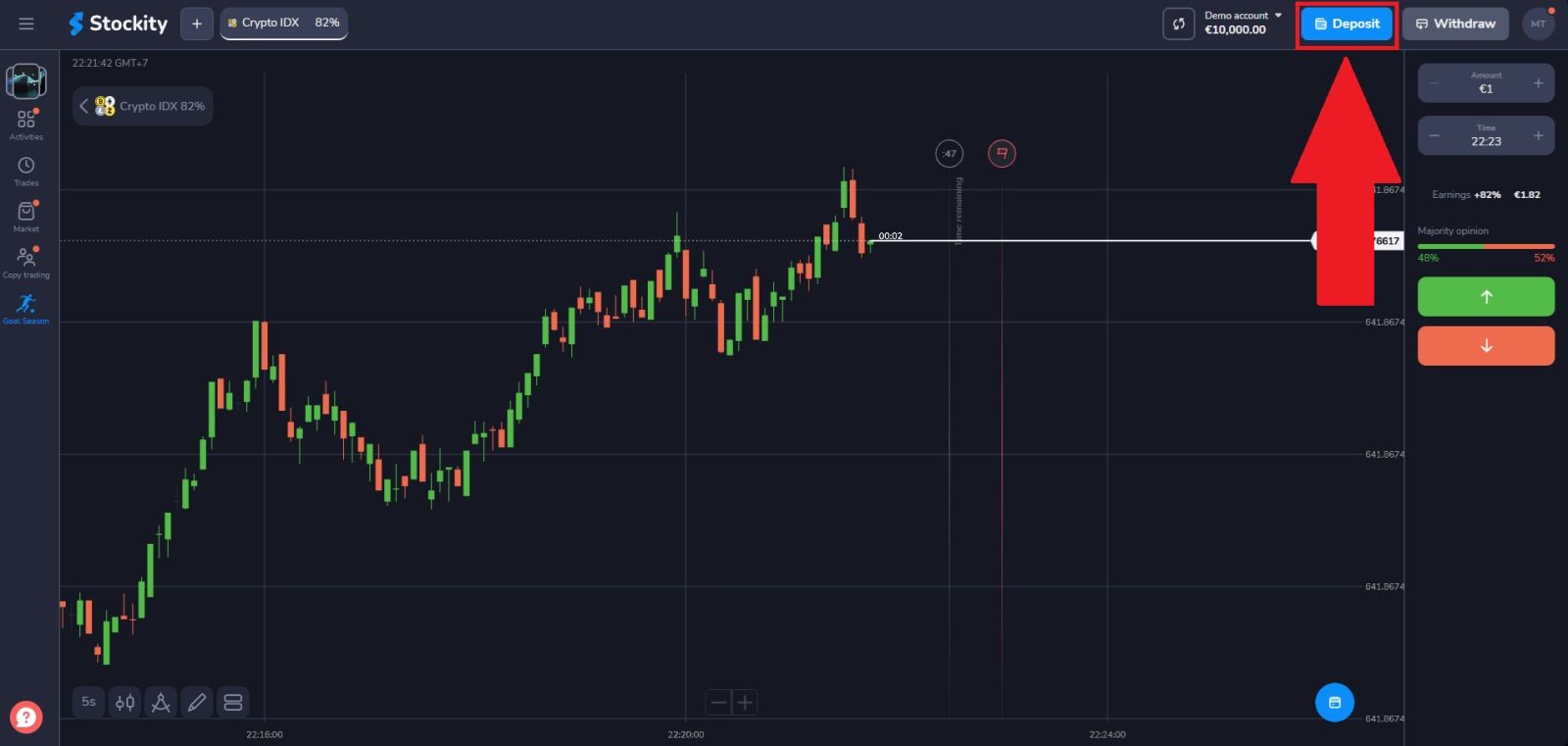
From your trading dashboard, locate and click the "Deposit" button on the right-side navigation menu. This section serves as the central hub for all your financial activity on Stockity, including deposits, withdrawals, and transaction history.
Step 3 — Choose Your Preferred Payment Method
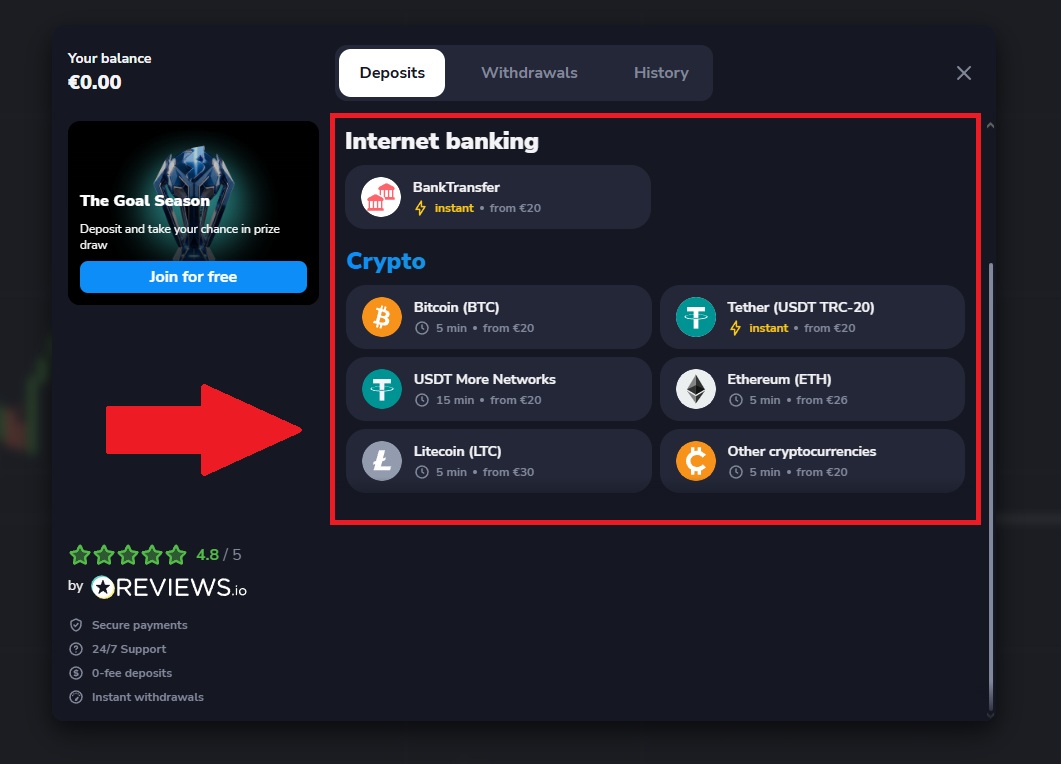
Browse through the list of available deposit options and select the method that works best for your situation. When making your choice consider:
- Speed — bank cards and e-wallets are fastest for immediate trading
- Fees — check whether your provider charges any processing fees
- Availability — not all methods are available in every country
- Convenience — choose the method you are most comfortable using
Click on your preferred payment method to proceed to the next step. (here, we’re choosing Tether-USDT TRC-20 as an example).
Step 4 — Enter Your Deposit Amount
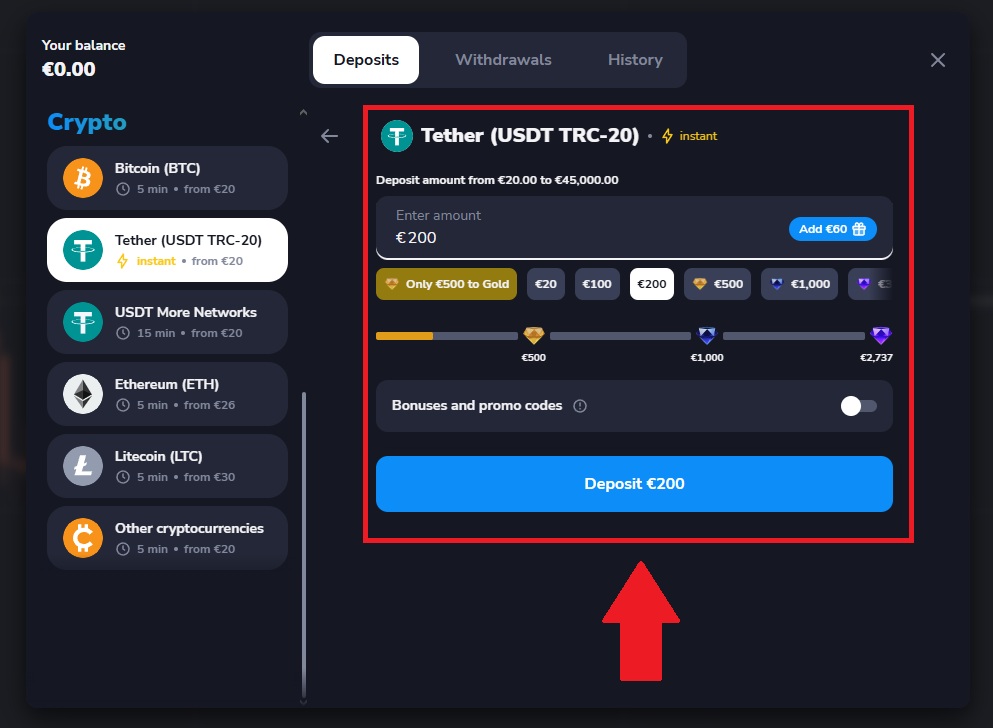
Once you reach the amount entry screen, select how much you want to deposit. You can either choose from the preset amount buttons displayed on the page or type a custom amount directly into the input field.
If you have a promo code, enter it in the designated field and click "Apply" to activate your bonus before proceeding. Make sure to read the bonus terms carefully as most offers come with trading volume conditions before they can be withdrawn.
Once your amount is set, click "Deposit..." to continue.
Step 5 — Complete Your Payment
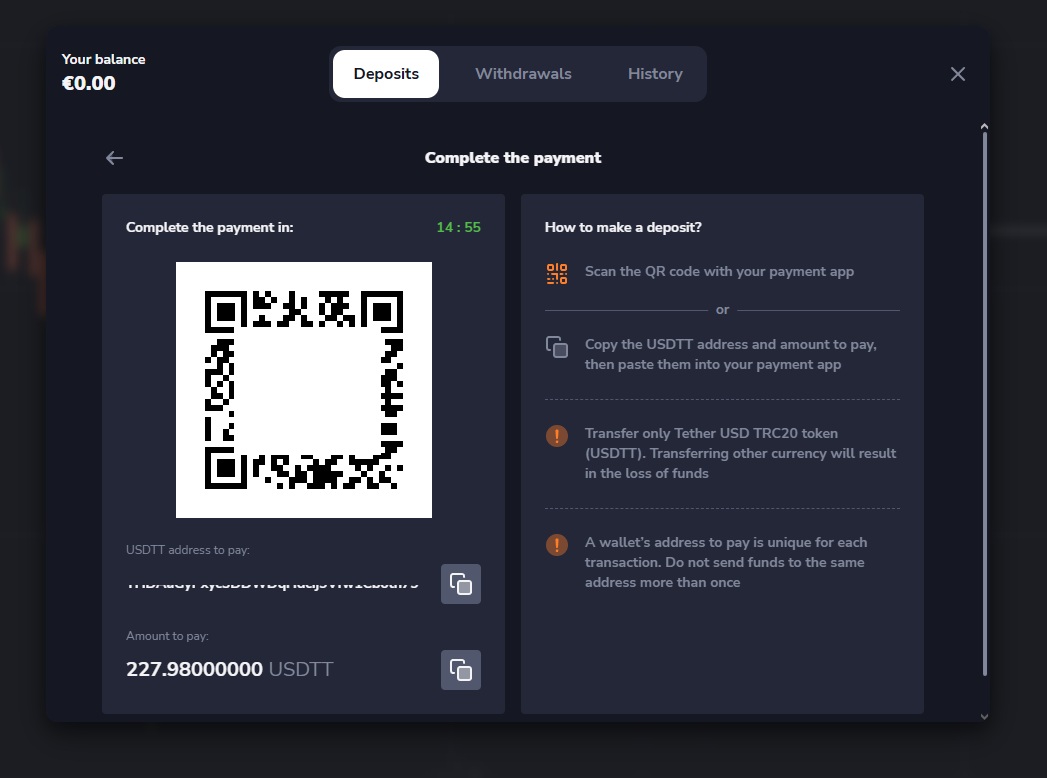
Once your deposit amount is confirmed, you will be redirected to the payment page to finalize the transaction.
On this page you will find your unique deposit wallet address. To complete the transfer, click the "Copy" icon to copy the address to your clipboard, or open your mobile crypto app and scan the QR code displayed on screen.
Once the transfer is submitted from your external wallet, return to your Stockity account and check your Payment History to monitor the status of your deposit. Your balance will update automatically once the required blockchain confirmations are completed.
Things Most Traders Do Not Know About Stockity Deposits
- Your demo and real balances are completely separate
Depositing funds only adds to your real trading account. Your demo account balance remains unchanged and can always be reset independently whenever you need more virtual funds to practice with.
- Be prepared for verification before a withdrawal
While verification is not required to deposit, it is required to withdraw. Completing your KYC verification early prevents any delays when you are ready to cash out your profits.
- Crypto deposits are available 24/7
Unlike card payments, which can occasionally face bank-side restrictions during certain hours, cryptocurrency deposits can generally be submitted around the clock, including weekends and public holidays - though a specific network or deposit channel may occasionally be unavailable for maintenance or other reasons
- Bonus funds come with conditions
Deposit bonuses increase your available trading balance but typically cannot be withdrawn until a specific trading volume requirement is met. Always read the full bonus terms before accepting any offer.
- Check for active promotions before every deposit
Stockity may run deposit bonus campaigns from time to time. Bonus funds are typically subject to turnover or withdrawal conditions - review the terms in the promotions section before accepting an offer, since it may affect when and how you can withdraw.
- Start small and scale gradually
There is no requirement to deposit a large amount from the start. Beginning with the minimum deposit lets you experience real trading conditions without overexposing your capital while you are still learning the platform.
What to Do After Your Deposit Is Confirmed
With real funds successfully added to your account here is the recommended sequence of next steps:
1. Complete identity verification if not already done
Submit your government-issued ID and proof of address through the Profile section. Verification typically takes 24 to 48 hours and must be completed before your first withdrawal can be processed.
2. Continue practicing on the demo account
Even with real funds deposited, continue using the demo account to refine your strategy before switching to live trading. There is no rush and the demo environment is always available.
3. Begin live trading with small position sizes
When you are ready to trade with real money, start conservatively. Use small trade amounts while you get comfortable with live market conditions before gradually increasing your position sizes.
4. Explore the full asset list
Browse Stockity’s complete range of available assets and identify the markets that best match your knowledge, trading style, and risk tolerance.
5. Understand the withdrawal process before you need it
Familiarise yourself with how to request a withdrawal so you are never caught off guard when you decide to request a withdrawal from your eligible balance for the first time.
Ready to withdraw? Stockity Withdrawal Guide
New to trading? How to Trade on Stockity for Beginners
Conclusion: Add Funds to Your Stockity Account with Ease
Funding your Stockity account is a fast and hassle-free process designed to get you trading as quickly as possible. By selecting your preferred payment method and completing the deposit steps correctly, you can transfer funds securely and efficiently.
Familiarizing yourself with supported payment options, processing times, and any applicable charges helps ensure a seamless transaction. With a secure deposit system and convenient funding options, Stockity provides a smooth experience from your first deposit onward.